

Upgrading your ERP system is not just about accessing new features, it’s about ensuring your business keeps running smoothly while evolving. For Automobile Parts eCommerce businesses, where thousands of SKUs, real-time inventory, and constant order flow are involved, even a small disruption can lead to lost revenue.
If you’re planning an Odoo 16 to 19 upgrade, the real challenge is not the upgrade itself, but doing it without downtime or operational risks.
Still on Odoo 16? You Might Already Be Noticing These Slowdowns
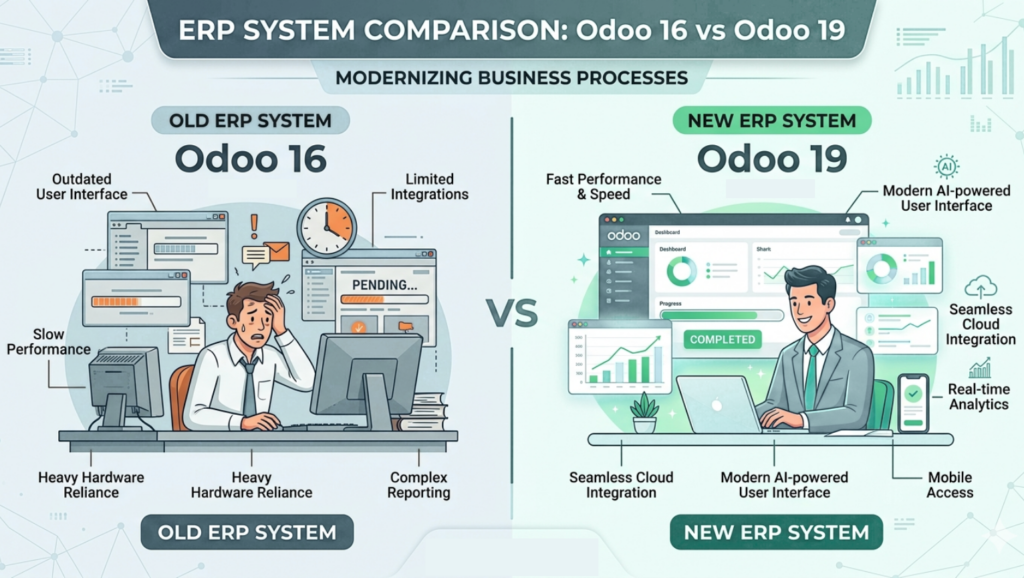
Over time, many businesses start noticing subtle but impactful changes. What once felt smooth and reliable slowly turns into a bottleneck that affects daily operations.
You may already be experiencing:
- Slower system performance affecting day-to-day efficiency
- Limited access to newer features available in Odoo 19
- Frequent integration breakdowns with third-party tools
- Increasing maintenance challenges with older versions
- Rising costs due to additional fees for continuing on Odoo 16 and older versions
What makes this more concerning is that these issues don’t appear all at once, they build up gradually, impacting productivity, customer experience, and overall business growth.
At some point, staying on an outdated system doesn’t just slow you down, it starts costing you more than upgrading. That’s when an Odoo ERP upgrade becomes not just a choice, but a necessary business decision.
Why Automobile Parts eCommerce Businesses Can’t Afford Downtime During an Odoo Upgrade
In the Automobile Parts industry, accuracy and speed are everything. Customers rely on real-time inventory and fast order processing.
Any disruption during an Odoo migration can result in:
- Missed or delayed orders
- Inventory mismatches
- Customer dissatisfaction
This is why businesses specifically look for Odoo upgrade services without downtime.
What Actually Breaks During an Odoo Migration (And Why It’s Risky)
An ERP upgrade impacts more than just your backend. Without proper planning, several issues can arise:
- Custom modules becoming incompatible
- Payment gateways and shipping integrations failing
- Workflow automation disruptions
- Data inconsistencies across systems
These are common Odoo migration challenges that can severely affect operations.
The Hidden Costs of a Poorly Planned Odoo Upgrade
Many businesses underestimate the impact of a poorly executed upgrade.
Some hidden costs include:
- Revenue loss due to downtime
- SEO impact from broken product pages
- Increased operational errors
- Higher long-term support costs
This is why following proper ERP upgrade best practices is critical.
How to Upgrade Odoo Without Downtime: A Practical Approach
A smooth Odoo upgrade without downtime requires a strategic approach:
- Setting up a staging environment
- Running parallel systems
- Testing real-world workflows
- Ensuring continuous data synchronization
This allows your business to operate normally while the upgraded system is being prepared.
Step-by-Step Odoo Upgrade Process for eCommerce Businesses
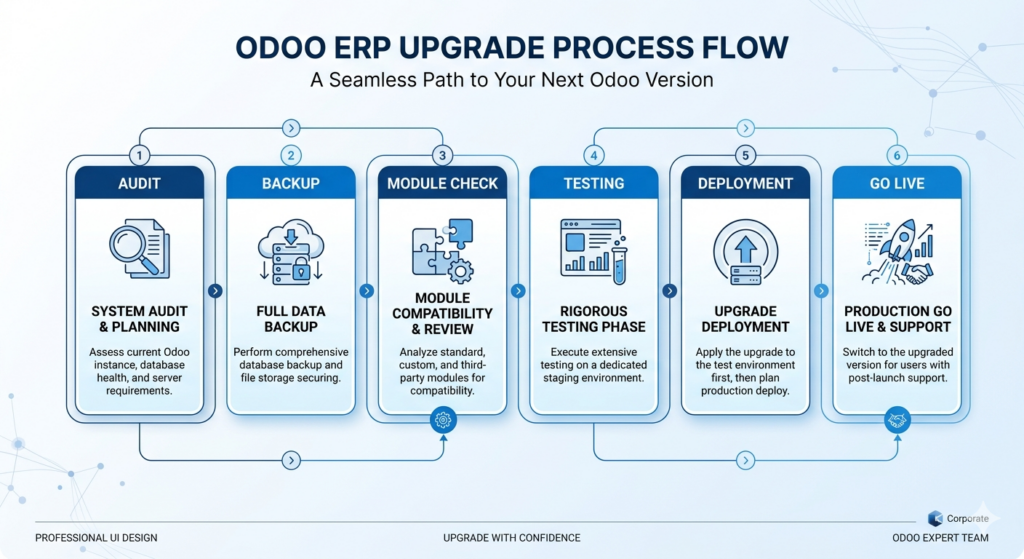
A structured Odoo upgrade process step by step ensures success:
- System Audit – Analyze current workflows and dependencies
- Data Backup – Secure all business-critical information
- Compatibility Check – Review custom modules and integrations
- Testing Phase – Simulate real business scenarios
- Deployment – Execute a controlled upgrade
This approach minimizes risk and ensures a smooth transition.
Handling Large Inventory: Odoo Upgrade for Automobile Parts eCommerce
Automobile Parts businesses deal with large catalogs and complex inventory systems. During an Odoo upgrade for eCommerce stores:
- Inventory must remain accurate
- Orders must continue processing
- Product data must stay consistent
A strong migration strategy ensures there is no disruption in these critical operations.
What Happens to Your Website & SEO After an Odoo Upgrade?
An Odoo ERP upgrade can impact your website if not handled carefully.
Key areas include:
- URL structure and indexing
- Product page performance
- Page speed improvements
Done correctly, an upgrade can actually improve SEO and overall site performance.
Common Mistakes to Avoid During an Odoo Upgrade
Many businesses face issues due to avoidable mistakes:
- Upgrading directly on the live system
- Skipping testing phases
- Ignoring data validation
- Underestimating customization complexity
Avoiding these mistakes is key to a successful upgrade.
How Techmatic Systems Handles Odoo Upgrades Without Disruption
Upgrading ERP systems without affecting operations requires a well-defined strategy.
At Techmatic Systems, the focus is on ensuring business continuity during the entire migration process.
The approach includes:
- Parallel system setup to keep your current operations running
- Real-time data synchronization to avoid data loss
- Custom module optimization for Odoo 19 compatibility
- Staging environment testing with real workflows
- Controlled deployment after full validation
This ensures a smooth, secure, and zero-disruption Odoo migration.
Upgrade with Confidence, Not Risk
An upgrade is not just a technical change, it’s an opportunity to improve performance, streamline operations, and scale your business.
With the right Odoo upgrade partner like Techmatic Systems, you can move from Odoo 16 to 19 smoothly, without risking your daily operations or customer experience.
FAQs
- Can I upgrade Odoo without downtime?
Yes, with the right strategy such as staging environments and parallel systems, businesses can perform an Odoo upgrade without downtime while ensuring continuous operations and data consistency. - How much does an Odoo 16 to 19 upgrade cost?
The cost depends on system complexity, custom modules, and integrations. Businesses should consult an experienced Odoo upgrade service provider for an accurate estimate based on their requirements. - What are common issues during Odoo migration?
Common issues include broken integrations, incompatible custom modules, data inconsistencies, and workflow disruptions. Proper planning and testing help avoid these problems during the upgrade process. - How long does an Odoo upgrade take?
The timeline varies based on business size and system complexity. Typically, it can take a few weeks to a couple of months, including testing and deployment phases. - Why should I hire an Odoo upgrade expert?
Hiring an expert ensures a smooth upgrade, minimizes risks, and helps maintain business continuity. Experienced providers handle technical challenges and ensure your system runs efficiently post-upgrade.